> ## Documentation Index
> Fetch the complete documentation index at: https://forgetwork.mintlify.site/llms.txt
> Use this file to discover all available pages before exploring further.
# 🚦 Status
> See where every task stands
 ## What is this?
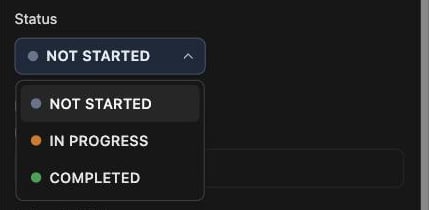
Every task is in one of three states: **Not Started**, **In
Progress**, or **Completed**, each with its own color dot.
It's a quick answer to the question your brain keeps asking: "wait,
where was I with this?"
## How does it work?
Open a task's [Details](/guides/task-details) drawer and pick a status
from the dropdown.
Most of the time you won't need to touch it, because forget.work keeps
it updated for you:
* Start [focusing](/guides/focus-time) on a task and it flips to **In
Progress**
* Complete a task and it becomes **Completed**
* A task with [subtasks](/guides/subtasks) rolls up from them. When
they're all done, the parent is done too
Completed tasks are locked. Redo the task from the
[List](/guides/list) to change its status again.
This documentation is built and hosted on [Mintlify](https://mintlify.com), a developer documentation platform.
## What is this?
Every task is in one of three states: **Not Started**, **In
Progress**, or **Completed**, each with its own color dot.
It's a quick answer to the question your brain keeps asking: "wait,
where was I with this?"
## How does it work?
Open a task's [Details](/guides/task-details) drawer and pick a status
from the dropdown.
Most of the time you won't need to touch it, because forget.work keeps
it updated for you:
* Start [focusing](/guides/focus-time) on a task and it flips to **In
Progress**
* Complete a task and it becomes **Completed**
* A task with [subtasks](/guides/subtasks) rolls up from them. When
they're all done, the parent is done too
Completed tasks are locked. Redo the task from the
[List](/guides/list) to change its status again.
This documentation is built and hosted on [Mintlify](https://mintlify.com), a developer documentation platform.