> ## Documentation Index
> Fetch the complete documentation index at: https://forgetwork.mintlify.site/llms.txt
> Use this file to discover all available pages before exploring further.
# 🪜 Subtasks
> Break big tasks into bite-sized steps
 ## What is this?
Big tasks are where ADHD brains go to stall.
"Write the report" feels impossible. "Outline three sections" doesn't.
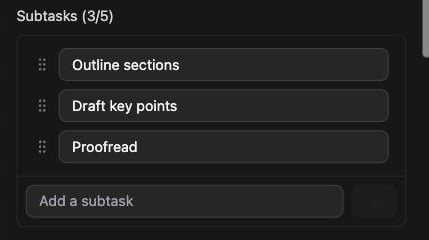
Subtasks let you split a task into small, doable steps, right inside
the task itself.
## How does it work?
Open a task's [Details](/guides/task-details) drawer and type in the
**Add a subtask** field.
Each task can hold up to 5 subtasks. You can rename them and drag them
into the order you want.
## Subtasks and timers
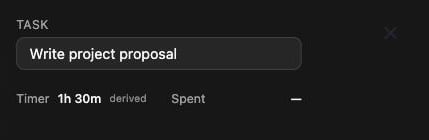
Give your subtasks timers and the parent task's timer becomes the sum
of them. You'll see it marked as **derived** in the drawer.
## What is this?
Big tasks are where ADHD brains go to stall.
"Write the report" feels impossible. "Outline three sections" doesn't.
Subtasks let you split a task into small, doable steps, right inside
the task itself.
## How does it work?
Open a task's [Details](/guides/task-details) drawer and type in the
**Add a subtask** field.
Each task can hold up to 5 subtasks. You can rename them and drag them
into the order you want.
## Subtasks and timers
Give your subtasks timers and the parent task's timer becomes the sum
of them. You'll see it marked as **derived** in the drawer.
 When you [focus](/guides/focus-time), a task with subtasks acts as a
container: you focus its subtasks one by one instead of the parent.
Subtasks are one level deep, so a subtask can't have subtasks of its
own. They're also only available on desktop.
This documentation is built and hosted on [Mintlify](https://mintlify.com), a developer documentation platform.
When you [focus](/guides/focus-time), a task with subtasks acts as a
container: you focus its subtasks one by one instead of the parent.
Subtasks are one level deep, so a subtask can't have subtasks of its
own. They're also only available on desktop.
This documentation is built and hosted on [Mintlify](https://mintlify.com), a developer documentation platform.