> ## Documentation Index
> Fetch the complete documentation index at: https://forgetwork.mintlify.site/llms.txt
> Use this file to discover all available pages before exploring further.
# 🏝️ Dynamic Island
> Your focus session, always in view
 ## What is this?
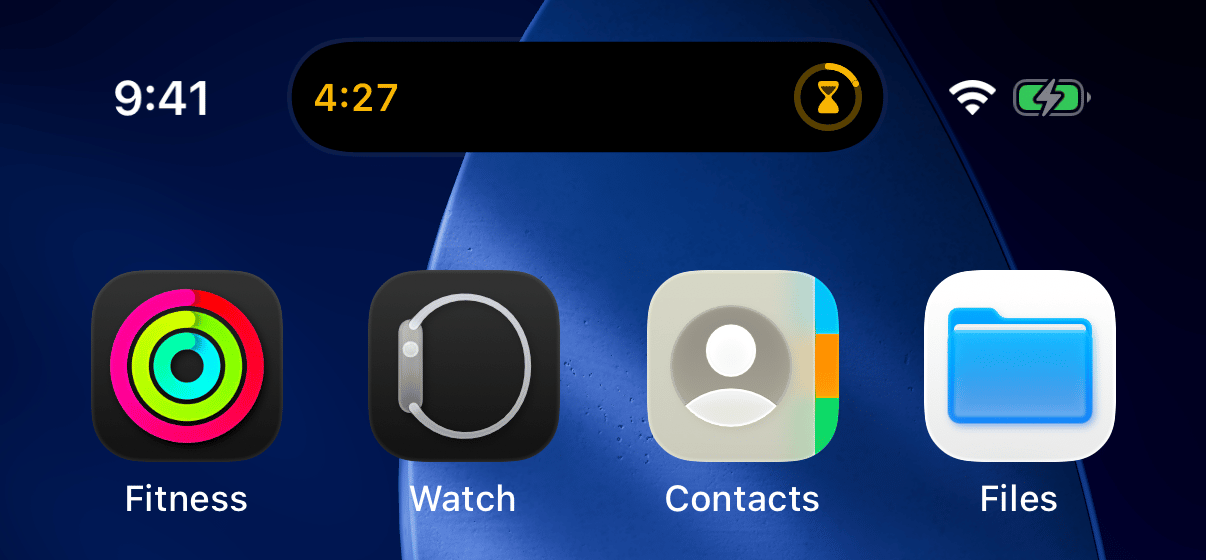
Start a [focus session](/ios/focus-time), switch to another app, and
your session doesn't disappear: it moves into the Dynamic Island.
The elapsed time ticks on one side, a progress ring fills on the
other. Your session is always one glance away, no matter what you're
doing.
## How does it work?
There's nothing to set up. Whenever a focus session is running, the
island shows it. Pause, and it shows the pause icon. Finish, and it
celebrates with a checkmark.
**Press and hold** the island to expand it:
## What is this?
Start a [focus session](/ios/focus-time), switch to another app, and
your session doesn't disappear: it moves into the Dynamic Island.
The elapsed time ticks on one side, a progress ring fills on the
other. Your session is always one glance away, no matter what you're
doing.
## How does it work?
There's nothing to set up. Whenever a focus session is running, the
island shows it. Pause, and it shows the pause icon. Finish, and it
celebrates with a checkmark.
**Press and hold** the island to expand it:
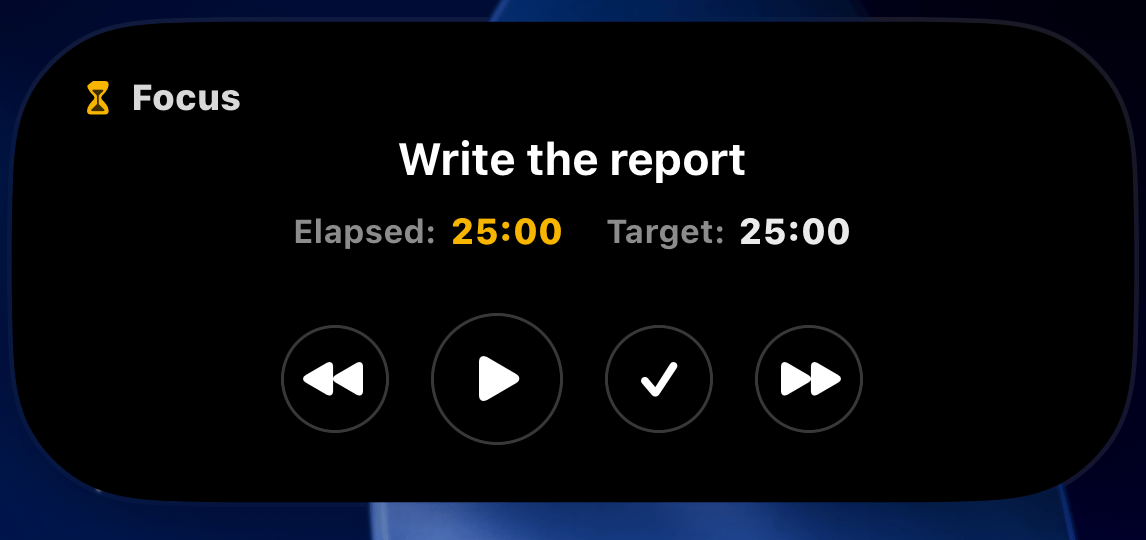 The expanded view shows the task name, elapsed time against your
target, and a full set of controls: **back**, **pause**,
**complete**, and **skip ahead**. They work right there, without
opening the app.
On iPhones without a Dynamic Island, the same live card appears on
the [Lock Screen](/ios/lock-screen) and in Notification Center.
This documentation is built and hosted on [Mintlify](https://mintlify.com), a developer documentation platform.
The expanded view shows the task name, elapsed time against your
target, and a full set of controls: **back**, **pause**,
**complete**, and **skip ahead**. They work right there, without
opening the app.
On iPhones without a Dynamic Island, the same live card appears on
the [Lock Screen](/ios/lock-screen) and in Notification Center.
This documentation is built and hosted on [Mintlify](https://mintlify.com), a developer documentation platform.