

What is this?
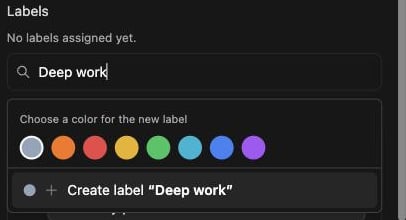
Labels are color-coded tags for your tasks. Think “Deep work”, “Admin”, or “Errands”. They add just enough structure to group your day without turning forget.work into a project manager.How does it work?
Open a task’s Details drawer and go to the Labels section. Type a name, pick one of the 8 preset colors, and it’s created and assigned in one go. Next time, just pick it from the list. You can also rename a label, change its color, or delete it. Changes apply everywhere the label is used.Limits
To keep things simple:- Up to 3 labels per task
- Up to 50 labels per account
- Labels live on top-level tasks only, not on subtasks
Unfinished tasks carry their labels with them to the next day.